When choosing a power drill, most people focus on voltage or wattage, but the real performance difference comes from torque and speed. These two factors determine how efficiently, cleanly, and safely you can complete your drilling or fastening tasks. Understanding how they interact will help you get precise results every time.
Understanding Torque and Speed
Torque (Nm)
Torque is the twisting force that drives the drill bit, measured in Newton-meters (Nm). It determines how much power your drill can apply when turning a screw or bit.
Key points:
- Higher torque provides more driving force, ideal for long screws, thick wood, and tough materials.
- Lower torque protects small fasteners and delicate surfaces from damage.
Speed (RPM)
Speed, measured in revolutions per minute (RPM), tells you how fast the drill bit spins.
Key points:
- High speed gives faster drilling and smoother holes in wood, plastic, or thin metal.
- Low speed offers better control and prevents overheating in dense materials.
How Torque and Speed Work Together
Torque and speed share the same power source and naturally balance each other.
When torque increases, the drill slows down under heavier load; when the speed increases, torque output drops.
Simple logic:
- Use low speed and high torque for power and precision in tougher materials.
- Use high speed and low torque for light-duty, fast drilling.
That’s why most modern cordless drills include two-speed gear settings and an adjustable torque ring—so users can fine-tune performance for different tasks without damaging materials or overdriving screws.
Recommended Settings by Task
| Task | Recommended Setup | Reason |
| Driving long screws | Low speed, high torque | Prevents stripping or splitting the material |
| Drilling into wood | Medium speed, medium torque | Balances drilling speed and control |
| Drilling into metal | High speed, low torque | Produces smooth, clean holes |
| Drilling into concrete (hammer mode) | Low speed, high torque | Provides power for penetration |
| Furniture assembly / light-duty work | Low speed, low torque | Prevents overdriving or surface damage |
Tip:
Most cordless drills now feature a variable-speed trigger and precise torque adjustment ring. These allow you to switch smoothly between different torque and speed levels, adapting to various materials and applications with ease.
Ideal Torque and Speed by Material
| Material | Ideal Speed (RPM) | Ideal Torque (Nm) | Best Practice |
| Softwood | 800–1,200 | 20–30 | Use medium speed and moderate torque to prevent cracking |
| Hardwood | 500–800 | 35–50 | Drill at low speed for better stability and accuracy |
| Metal | 1,200–2,000 | 20–30 | Use high speed and cutting oil for smoother holes |
| Concrete | 400–700 | 50+ | Combine low speed with hammer mode for better penetration |
| Plastic / Drywall | 1,000–1,500 | 10–20 | Use high speed and light pressure to avoid melting or tearing |
If you notice the bit slipping, smoking, or squealing, stop immediately and adjust your settings. Let the torque and the sharpness of your bit do the work—avoid forcing the drill.
How to Adjust Torque and Speed
1. Adjusting the Torque Ring
The torque ring (or clutch) is located just behind the chuck. It sets the maximum torque level before the clutch slips.
- Lower numbers = lower torque → ideal for small screws or light-duty work.
- Higher numbers = higher torque → for dense materials and larger fasteners.
- The drill icon = full torque mode → use this only for drilling holes, not for driving screws.
Pro tip: Start at a mid-range torque setting and increase gradually until screws stop flush with the surface without overdriving.
2. Selecting the Right Gear and Trigger Pressure
Modern drills typically offer two mechanical speed gears plus an electronic variable-speed trigger.
- Low gear (1st speed): High torque, low speed — for heavy driving or thick materials.
- High gear (2nd speed): High speed, lower torque — for general drilling.
- Variable trigger: The deeper you press, the faster it spins. Light pressure offers precise low-speed control.
Practical setup steps:
- Choose low gear for driving screws, high gear for drilling.
- Adjust the torque ring for the right level of resistance.
- Test on scrap material before working on the actual surface.
Common Questions and Mistakes
Is Higher Speed Always Better?
No. Higher speed without enough torque causes slipping, heat buildup, and dull bits. Balance both based on the material.
Do I Only Need High Torque for Heavy-Duty Jobs?
Not exactly. Even light tasks need proper torque to prevent wobbling or inconsistent starts when drilling.
Can I Just Use One Setting for Everything?
That’s a common mistake. Keeping your drill at max speed and torque for all jobs leads to stripped screws, cracked surfaces, and burnt bits.
Will Pressing Harder Make Drilling Faster?
No. Excess pressure bends bits, overheats the material, and reduces accuracy. Let the drill’s torque and sharp bit do the work.
Do Drills Automatically Adjust Torque and Speed?
No. You must manually set the gear and torque level. However, drills naturally slow down under heavier loads due to power balance.
How to Choose the Right Power Drill
When buying a drill, don’t just compare voltage. Look for features that give you better control and versatility.
Key features to check:
- Two-speed gear settings for both control and speed
- Adjustable clutch with multiple torque steps
- Variable-speed trigger for smooth RPM control
- Brushless motor for better efficiency and longer life
- Stable low-speed performance without vibration
- Ergonomic grip and balanced design
Buying recommendations:
- DIY or home use: 18V/20V compact drill, two speeds, full clutch range.
- Renovation or construction: High torque output with metal gearbox and durable housing.
- Metal or concrete work: Strong low-speed power and hammer function.
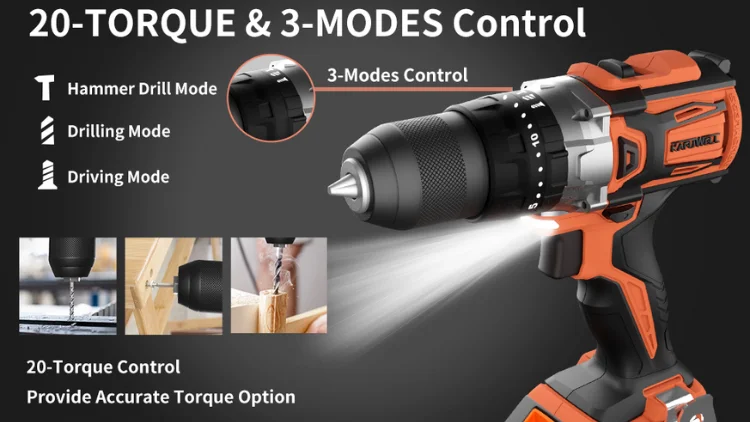
For users who need steady power and precise control, we recommend the Kafuwell Brushless Dual-Speed Impact Drill.
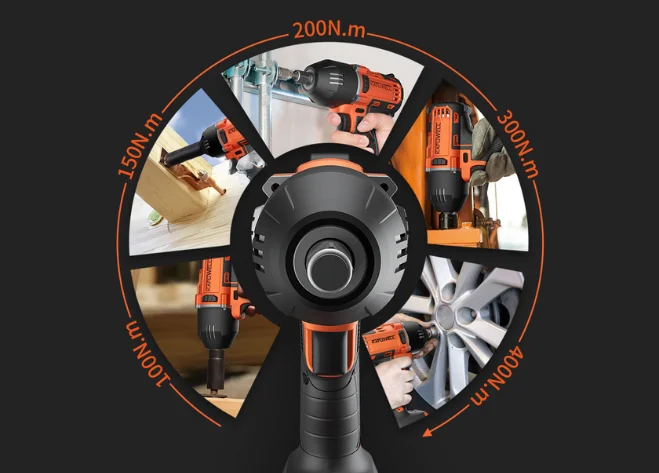
It features a two-speed gear system and a brushless motor, delivering up to 150 N·m of strong torque for efficient, effortless drilling through wood, steel, and concrete.
Key Takeaways
- Torque and speed work together — adjust both based on task and material.
- Hard materials → lower speed, higher torque.
- Soft materials → higher speed, lower torque.
- Always test on scrap material before drilling.
- Pay attention to warning signs like smoking, vibration, or slippage.
Conclusion
By understanding how torque and speed affect drill performance, you can work smarter, safer, and more efficiently on every job.At Kafuwell, we handle everything from flexible small-batch orders to large-scale production. Contact us to discuss your budget and project needs — our team can help you build the right solution for your business.